Almost every service business owner I work with asks the same question at some point: should we put prices on the website? The fear is always the same too. Show a number and you scare people off, or a competitor undercuts you, or a client holds you to a figure that didn’t fit their situation.
My answer is usually yes, but not as a flat price list. For most service businesses, the better move is an online fee estimator: a short, honest tool that lets a visitor describe their situation, see a realistic range or starting price, and then book a conversation. Done well, it answers the price question, filters out people who were never a fit, and hands you a warmer lead. I built one for OSCPA Tax Advisory, and I’ll use it as the worked example throughout.
Should a service business show prices online?
The honest answer depends on how standardised your work is. If two jobs of the same type cost roughly the same, hiding the price mostly just slows people down. If every job is genuinely custom, a single number will be wrong for most visitors.
Here is how I think about it:
- Show a fixed price when the service is repeatable and the scope is easy to describe. A standard tax return, a logo refresh, a one-hour consultation.
- Show a starting price or range when the base is predictable but extras vary. This covers most trades, clinics, agencies and professional services.
- Use an estimator when the price is built from parts the client already knows about their own situation. How many rooms, how many employees, which tax forms.
- Hold back the number only when the price truly depends on things the client can’t know until you’ve assessed them, and even then, say what drives the cost.
What I’ve seen consistently is that “call for pricing” doesn’t stop price shoppers. It just moves the price conversation onto your phone line, where it costs you staff time to have it.
What the research says about transparency
I’m careful here, because a lot of “studies show” claims about pricing pages trace back to marketing blogs rather than actual research. Two pieces of original research are worth knowing, and neither is a simple “show prices, get more sales” result.
In The Labor Illusion (Buell and Norton, Management Science, 2011), five experiments found that when websites made the work they were doing visible, people valued the service more, and could even prefer a site with a longer wait over one that returned identical results instantly. The authors call this operational transparency.
In Lifting the Veil: The Benefits of Cost Transparency (Mohan, Buell and John, Harvard Business School working paper), a field experiment with an online retailer and six lab experiments found that revealing a product’s unit costs boosted purchase interest. The same paper also found the effect reversed when the firm’s profit margins were shown to be high compared with competitors.
Neither study tested a tax firm’s fee calculator, so I don’t claim they prove mine works. What I take from them is narrower: showing people how a price is built, and what work sits behind each line, tends to make the price feel more legitimate. That is exactly what a good estimator does.
What I built for OSCPA Tax Advisory
OSCPA Tax Advisory is a tax firm I’ve worked with on a rebrand, website and AI integration. Tax preparation is a perfect estimator business: the fee depends mostly on which forms a client needs, and clients often know their situation (a job, a rental, a side business) even if they don’t know the form names.
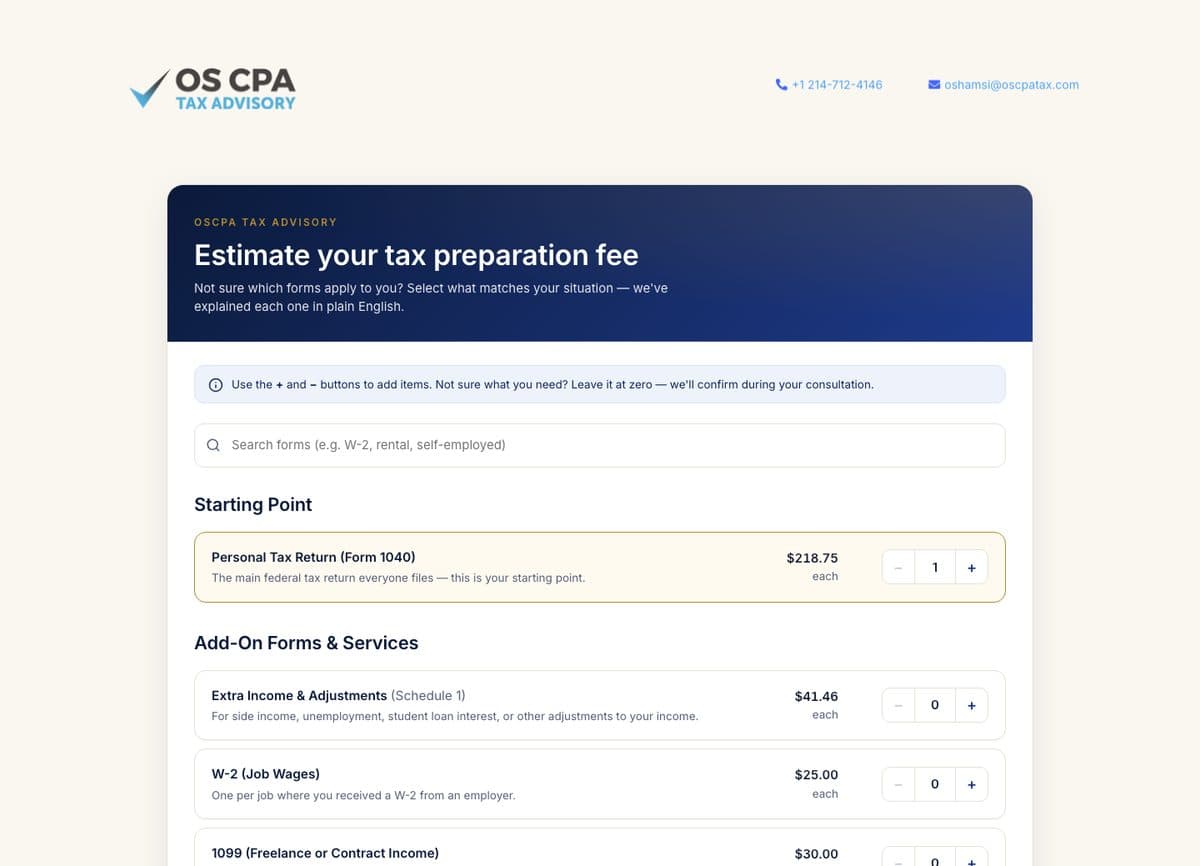
The OSCPA Fee Estimator works like this, and you can try the live estimator yourself:
- A starting point. A personal tax return (Form 1040) is preselected as the base, because everyone filing needs one.
- Add-ons in plain English. Each form has a human label and a one-line explanation, such as “W-2 (Job Wages): one per job where you received a W-2 from an employer” or “Rental Property Income (Schedule E)”. Clients pick what matches their life, and the form number sits in the background.
- Quantities, not just checkboxes. Plus and minus buttons let someone add two W-2s or three rental properties, because that is how the work actually scales.
- Search. A search box takes words like “rental” or “self-employed”, since people search by situation, not by schedule letter.
- A running summary. The base fee, add-ons and estimated total update as you go.
- Permission to not know. A note at the top says that if you’re not sure what you need, leave it at zero and the firm will confirm during the consultation.
- A clear next step. The visitor can send themselves the quote and book a free 15-minute consultation, or print and save it as a PDF.
The page also carries a plain disclaimer that the figure is a good-faith estimate based on the selected forms, and that final pricing can vary with complexity, record quality and scope found during the consultation. I’ll come back to why that sentence matters.
How a fee estimator qualifies leads
A contact form tells you someone is interested. An estimator tells you what they need and whether they’ve already seen the price. That changes the first call.
In my experience, the qualifying happens in three ways:
- Self-selection. Someone who wanted a much cheaper option sees the starting price and leaves without taking up a consultation slot. That is a good outcome for both sides.
- Context before the call. When the quote travels with the booking, the person taking the call already knows the client has, say, a business schedule and a rental. The conversation starts at “let’s confirm this” rather than “so, tell me about your taxes.”
- Price anchoring done honestly. The client arrives with a number they built themselves. If the final fee is higher because of messy records, the explanation is specific: here is the line that changed and why.
The second point is where most of the value is. If you already run a CRM, the estimator should push the selected items into the lead record, not just an email. I’ve written about that choice in custom CRM versus off-the-shelf, and about the follow-up automations that pair well with it in automation ideas for small businesses.
The legal side of putting prices online
Most of this is common sense, but it has real rules behind it. These are the ones I check against when I build a pricing tool.
The FTC Act: don’t mislead
Section 5 of the FTC Act, at 15 U.S.C. § 45, declares “unfair or deceptive acts or practices in or affecting commerce” unlawful. It is broad on purpose. For an estimator, the practical reading is that the number shown should be a number you would actually charge for the situation described.
The hidden fees rule, and who it covers
The FTC’s Rule on Unfair or Deceptive Fees (16 CFR Part 464) requires businesses to show the total price clearly and conspicuously, and more prominently than other pricing information. But read the definitions: it applies to “covered goods or services,” which the rule defines as live-event tickets and short-term lodging. A plumber, a clinic or a tax firm is not directly covered by Part 464.
I still treat it as a good design standard. Its definition of “clear and conspicuous” says that on the internet a required disclosure must be “unavoidable,” and must not be contradicted by anything else in the communication. That is a sensible bar for any estimator: no mandatory fee that only appears after someone books.
Bait advertising: the risk for lead-gen tools
This is the one that applies most directly to estimators. The FTC’s Guides Against Bait Advertising (16 CFR Part 238) define bait advertising as “an alluring but insincere offer to sell a product or service which the advertiser in truth does not intend or want to sell,” and note that its primary aim is “to obtain leads.” The guides also say that the law is violated if the first contact is secured by deception, even when the true facts come out later.
So an estimator that shows a low number purely to get the phone call, with every real job priced well above it, is exactly the pattern the guides describe. The fix is to price the estimator honestly and keep the disclaimer specific about what can change the final fee.
Profession-specific rules
Some professions also have their own fee rules. For tax practitioners, Treasury’s Circular 230 says at 31 CFR § 10.27 that a practitioner may not charge an unconscionable fee in connection with any matter before the IRS. Lawyers, doctors and contractors often have their own licensing board or state rules too. Ask your board or attorney before you publish.
How to build a fee estimator that works
The build itself is the easy part. The hard part is the pricing logic and the words. This is the order I work in.
1. Turn your price sheet into components
Sit with whoever quotes jobs today and write down how they actually price. Usually there is a base, a handful of add-ons and a few quantity drivers. If your team can’t agree on the components, the estimator will expose that, which is useful in itself.
2. Name every option in the client’s words
Clients don’t know “Schedule E.” They know “I rent out a property.” Lead with the situation, keep the technical name secondary, and add a one-line explanation. This is also where the labor illusion research is relevant to me: each explained line shows the client a piece of real work.
3. Write a disclaimer that names the variables
“Prices subject to change” is vague. “Final pricing may vary based on complexity, record quality and scope discovered during your consultation” tells the client exactly what could move the number. Put it next to the total, not in the footer.
4. Let people skip what they don’t know
A visitor who can’t answer a question will leave. Default unknowns to zero or “not sure” and promise to confirm on the call, the way the OSCPA tool does.
5. Make the next step obvious
The end of the estimator should offer one primary action, like booking a consultation, with the quote attached. A secondary option to save or print helps people who need to check with a partner first.
6. Keep it fast and accessible
An estimator is an interactive page, so it can get heavy. I build them as lightweight components with real buttons, labelled inputs and keyboard support. If performance is new territory for you, start with Core Web Vitals explained for business owners.
Frequently asked questions
Will showing prices online scare away customers?
It will turn away some people who wanted a much cheaper option, and in my experience that is usually a benefit, because they were unlikely to book. Customers who are a fit tend to arrive better informed. The research I trust here is about transparency in general, not a guarantee for your industry, so test it and watch your booking quality.
Is a fee estimator legally binding?
That depends on your wording, your engagement terms and your state’s law, so ask an attorney. What I do is label the figure clearly as an estimate, list what can change it, and confirm the final fee in a written engagement before any work starts.
Does the FTC hidden fees rule apply to my service business?
As written, 16 CFR Part 464 covers live-event tickets and short-term lodging. Most service businesses are outside it. The general FTC Act ban on deceptive practices and the bait advertising guides still apply, and some states have their own pricing rules.
Should I show a price range or a starting price?
A starting price works when the base is fixed and extras add on, like a tax return plus schedules. A range works when the same job can vary a lot. Either way, make the lower figure something you will actually honour.
Can a fee estimator connect to my CRM?
Yes. A custom estimator can send each selected item and the total into your CRM as part of the lead, so your team sees the quote before the first call. That is often the most useful part of the build.
Want one for your business?
If your quotes follow a pattern, you probably have an estimator hiding in your price sheet. Get in touch and I’ll tell you honestly whether it makes sense for your business, and what I’d put in it.